References
Description
This assignment will serve as an introduction to the topic of algorithms and data structures, and as a review of CS112. The goal is to implement an algorithm for evaluating an (infix) arithmetic expression. The algorithm uses the
Stack data structure to keep track of intermediate results.
The final application that you turn in should work similar to s typical
Calculator application. The calculator should work with decimal numbers and support the following operations:
addition,
subtraction,
multiplication,
division,
exponentiation. In addition, the user should be allowed to use
parentheses to group sub-expressions. The GUI should include the
= button to indicate the end of expression and should have a
clear button.
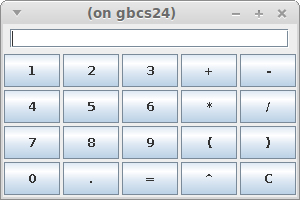
Preliminaries
Follow the instructions on Moodle to download the IDE that we will use this semester. The video shows instructions for CS111, but the steps are the same. You will mostly use the buttons:
- "New" (to create a new project): go to the desired folder and type the name of the project (
Calculator for this assignment)
- "Open" (to open existing project): go to the desired folder and "tap" on the project name to select it
- "Run" (to run the current project): first make sure in the IDE to be viewing the file that has the "main" method
Create a project named
Calculator.
You may modify/adapt the following starter code for your JavaFX application:
Calculator.java
Put each class in a separate file. Javadoc and formal testing is not required for this assignment.
The Algorithm
Here is the algorithm for evaluating arithmetic expressions:
1. create two stacks:

   * operand stack -- stores the numbers in the expression and intermediate results
   * operator stack -- stores operators that have not been evaluated

2. scan the input for individual tokens (either a number or an operator):

   2.1. if current token is a number:

              store it on operand stack

   2.2. otherwise (current token is an operator):

              as long as operator on top of the operator stack has
                         higher or equal precedence to current operator:

                    pop an operator and two operands
                    evaluate the popped operator
                    push the result back on the operand stack

              push current operator on top of operator stack

[ Parentheses and = operators require extra consideration. ]
The Calculator
Note the following about the pseudocode given above:
- Step 1 is implemented by creating appropriate data members for the
Calculator.
- Step 2 is implemented through
ButtonHandler and the corresponding ActionEvents (there is no loop that "scans/runs" through the text/expression typed by the user).
- The code in Step 2.2 should be put in a separate method that takes as parameter the current operator object.
- The
if-else in Step 2.1/2.2 are implemented in ButtonHandler and represent the decisions about which type of button was clicked.
The Operators
Implement the following operator hierarchy discussed in class:
                    Operator
                  ^    ^    ^
             ____/     |     \____________
            /          |                  \
           /           |                   \
      AddOperator  MulOperator  ...  RightParenOperator
For this assignment one data member that represents
precedence level will be sufficient. The data member(s) should be
private in the final submission (could be declared
protected initially).
The operator classes will have a single constructor and two methods:
int getPrecedence() -- returns the precedence level of this operatordouble evaluate(double a, double b) -- returns the result of evaluating the operator on the given parameters
Note: Some of the operators (e.g. parentheses, equal sign) will not have appropriate implementation of the method evaluate. For these operators, the method evaluate should throw UnsupportedOperationException.
Workflow
Here is possible workflow that starts with a basic version of the application and progresses toward the final version:
- Create a project with the given starter code. Ensure the code runs, then replace the
print statements in ButtonHandler with code that adds the corresponding symbol to the screen TextField each time a button is pressed.
- Initially ignore multi-digit numbers, so only test expressions that contain single digits.
- Start with a single operator class, i.e. only with
AddOperator and make sure the calculator can evaluate simple expressions such as 1+2+, 1+2+3+. The extra '+ at the end ensures that the actual expression to the left is evaluated completely and the result is on top of the stack. For now when = is pressed, show the result, i.e. the value on the top of the stack, on the screen. After this works, it will be simple to add the remaining arithmetic operators and the proper '=' operator, so that the expressions look like 1+2=, 1+2+3=.
- Add the parentheses after the arithmetic operators work correctly.
- Finally, add support for multi-digit numbers. One option is to add a
String data member and "glue" onto it the corresponding symbol each time a number button is pressed. In this approach the number is built as a string and is put on the stack when we detect that non-number button is pressed.
Follow good programming practices.