
double[].
Copy the following methods which will be used for testing:
With method
double[] toArray( double... numbers )
{
    return numbers;
}
Later in public void run(): Always keep first line. Rest can be commented out.double[] pickArrayName; pickArrayName = toArray( n, u, m, b, e, r, s ); test a method printArray( if necessary ) pickArrayName = toArray( n, u, m, b, e, r, s ); test a method printArray( if necessary )void printArray( double[] numbers ) { for ( int i = 0 ; i < numbers.length ; i = i + 1 ) { System.out.print( numbers[ i ] + " " ); } System.out.println(); }
toArray you can use the same variable name for the test array (see examples below), which should simplify testing (at least one time need to put double[] for the array variable).
Selection Sort algorithm from class:
Selection Sort Outline

1. for each index/item in the array:

       2. find index of smallest element to the right of current element

       3. swap current and smallest, if out of order
Write the following methods:
findIndexOfMinValue(numbers, startIndex)
This method returns the index of the smallest value in the portion of the given array that starts at startIndex and extends to the end of the array.
You may assume that startIndex will not be invalid (method selectionSort will ensure this).
For example,
                     0  1  2   3  4  5   6
testArray = toArray( 8, 9, 5, 10, 7, 6, 11 );
int index = findIndexOfMinValue( testArray, 3 );    // find index of min value starting at index 3
                                                    // returns 5 (i.e. the index of the number 6)

testArray = toArray( 8, 9, 5, 10, 7, 6, 11 );
int index = findIndexOfMinValue( testArray, 0 );    // find index of min value starting at index 0
                                                    // returns 2 (i.e. the index of the number 5)
selectionSort(numbers)
This method modifies the given array by arranging its elements in sorted order.
For example,
testArray = toArray( 3, 4, 9, 1, 6, 8, 2 );
selectionSort( testArray );
printArray( testArray );            // displays 1 2 3 4 6 8 9
Bubble Sort algorithm from class:
Bubble Sort Outline

1. for n-1 times:

       2. go through array and swap every pair that is out of order
Bubble Sort algorithm that sorts an array of doubles in increasing order and incorporates some of the improvements discussed in class. Specifically:
bubbleRun should not traverse the array completely every time it is called, since after k calls the k highest values are in the correct spotsbubbleSort should keep calling bubbleRun as long as the current run did at least one swap (when no swap is made the sorting is done)bubbleRun( numbers, numPairs )
This method modifies the given array by going through the given number of pairs of cells in the given array numbers and swapping every pair whose elements are out of order.
This method also returns true if there was at least one swap; otherwise false is returned.
Only one if and only one loop should be used in this method.
You may assume that numPairs will not be invalid (method bubbleSort will ensure this).
For example,
testArray = toArray( 1, 5, 4, 2, 3 );
boolean swapped = bubbleRun( testArray, 1 );    // examines the first 1 pairs; returns false
printArray( testArray );                        // displays 1 5 4 2 3
System.out.println( "Did it swap: " + swapped );    // displays false (1st pair in order)

testArray = toArray( 1, 5, 4, 2, 3 );
boolean swapped = bubbleRun( testArray, 2 );    // examines the first 2 pairs; returns true
printArray( testArray );                        // displays 1 4 5 2 3
System.out.println( "Did it swap: " + swapped );    // displays true (did a swap)

testArray = toArray( 1, 5, 4, 2, 3 );
boolean swapped = bubbleRun( testArray, 4 );    // examines the first 4 pairs; returns ?
printArray( testArray );                        // displays ? ? ? ? ?
System.out.println( "Did it swap: " + swapped );    // displays ?
bubbleSort(numbers)
This method modifies the given array by arranging its elements in sorted order. It works by repeatedly calling the method bubbleRun as long as it returns true, i.e. as long as there was at least one swap/modification during the current run.
The method bubbleSort should ensure that bubbleRun is asked to process fewer and fewer pairs each time it is called. The first time bubbleRun is called it examines all pairs of elements, the next time it examines one fewer pairs, and so on.
For example,
testArray = toArray( 1, 5, 4, 2, 3 );
bubbleSort( testArray );
printArray( testArray );                         // displays 1 2 3 4 5
Insertion Sort algorithm from class:
Insertion Sort Outline

1. for each index/item in the array:

       2. push current item to the left (to the beginning of array)
Write the following methods:
pushLeft(numbers, startIndex)
(Full Swap Version) This method modifies the given array by moving the item at the given index as far left (to the beginning) as possible.
For this version use the "full swap", i.e. the regular swap/exchange of two variables that we have been using since the Fibonacci example (keep;replace;store;. When the simpler version works, update it to use the "half swap".
You may assume that startIndex will not be invalid (method insertionSort will ensure this).
For example,
                     0  1  2  3  4
testArray = toArray( 5, 7, 8, 9, 6 );
pushLeft( testArray, 4 );            // push item at index 4 (i.e. 6) to the left
printArray( testArray )              // displays 5 6 7 8 9

testArray = toArray( 6, 7, 9, 5, 8 );
pushLeft( testArray, 3 );            // push item at index 3 (i.e. 5) to the left
printArray( testArray );             // displays 5 6 7 9 8
insertionSort(numbers)
This method modifies the given array by arranging its elements in sorted order. It simply calls the previous method enough times.
For example,
testArray = toArray( 5, 7, 9, 6, 8 );
insertionSort( testArray );
printArray( testArray );            // displays 5 6 7 8 9
pushLeft(numbers, startIndex)
(Half Swap Version) Update the "full swap" version to use "half swap" discussed in class (see the animation in the notes). The main idea is that the given item does not actually need to move forward. The given item can wait to the side and ask others to move one step (i.e. it does only the replace line of the "full swap" code) until eventually a smaller item is seen and then the given item goes behind it. The keep and store lines are still done, but only one time (where?).
Here is how the final version works (read this side-by-side with the animation from the class notes):
startIndex will not be invalid (method insertionSort will ensure this).
For example,
testArray = toArray( 5, 7, 8, 9, 6 );
pushLeft( testArray, 4 );            // push item at index 4 (i.e. 6) to the left
printArray( testArray )              // displays 5 6 7 8 9

testArray = toArray( 6, 7, 9, 5, 8 );
pushLeft( testArray, 3 );            // push item at index 3 (i.e. 5) to the left
printArray( testArray );             // displays 5 6 7 9 8
run() method must demonstrate thorough testing:
For all methods:
Copy the following method. It generates different array configurations depending on the character parameterimport java.util.Random; import java.util.Date;
order:
order is 'i', returns array with elements in increasing order and values 1,2,...,norder is 'd', returns array with elements in decreasing order and values n,n-1,n-2,...,1order is 'r', returns array whose elements have random values
    // returns an integer array of n elements such that
    // * if order is 'i' the array elements have values 1,2,...n
    // * if order is 'd' the array elements have values n,n-1,n-2,...,1
    // * if order is 'r' the array elements have random values
    //
    double[] generateArray( int n, char order )
    {
        Random rand = new Random( n );
        double[] numbers = new double[ n ];
        for ( int i = 0 ; i < n ; i = i + 1 )
        {
            if ( order == 'i' )
            {
                numbers[ i ] = i + 1;
            }
            else if ( order == 'd' )
            {
                numbers[ i ] = n - i;
            }
            else if ( order == 'r' )
            {
                numbers[ i ] = rand.nextInt();
            }
        }
        return numbers;
    }
void testSortAlgorithms( int initSize, int finalSize, int sizeStep, char order )
This method generates a table of execution times for the three algorithms for arrays of various sizes.
The first three parameters specify an initial array size, a final array size, and a size increment, and the last parameter is one of the characters 'i', 'd', 'r' to specify what configuration to test.
For example, if we execute testSortAlgorithms(2000, 14000, 3000, 'r') it should:
2000, 5000, 8000, 11000, 14000'r' was given)generateArray(...) to generate an array of a given size and for a given configuration.
Note: Make sure to run each sorting algorithm on its own array of the given size! That is, make sure you do not sort an array that has already been sorted!
Initially implement a simpler version that does not print a pretty table. Each row simply has four numbers: current size followed by the execution times of the three algorithms.
For example, if we execute testSortAlgorithms(2000, 14000, 3000, 'r') the method displays:
Here is how to find the execution time (in milliseconds) of a code section:2000 50 37 42 ← SIZE BB-time INS-time SEL-time 5000 70 48 57 8000 95 72 80 11000 120 90 105 ← timing numbers are made up 14000 143 123 130
long start = new Date().getTime();
bubbleSort( theArrayIWantToSort );
long stop = new Date().getTime();
long time = stop - start;
testSortAlgorithms so that the values are displayed in 4 aligned columns (this is the version to submit):
Here is how to useConfiguration: r ← for the first 3 lines use System.out.println ---------------- ← Size Bubble Select Insert ← 2000 50 37 42 ← for the following lines use System.out.printf 5000 70 48 57 which does formatted printing (see below) 8000 95 72 80 11000 120 90 105 ← timing numbers are made up 14000 143 123 130
System.out.printf to produce formatted output in columns:
int tic = 123;
int tac = 45;
int toe = 6;
System.out.printf("%10d %7d %4d \n", tic, tac, toe);

// %Nd means "take an int and display it in a column of width N right-justified"
// %-Nd means "take an int and display it in a column of width N left-justified"

// %10d applies to tic
// %7d applies to tac
// %4d applies to toe and so on
// \n means "go to next line"

System.out.printf( "%10d %7d %4d \n", tic, tac, toe );   // will display right-justified columns

       123      45    6            ← only this line is printed
       tic     tac  toe            ← not printed, only for illustration
      w=10     w=7  w=4            ← not printed, only for illustration

System.out.printf("%-10d %-7d %-4d \n", tic, tac, toe);  // will display left-justified columns

123        45      6               ← only this line is printed
tic        tac     toe             ← not printed, only for illustration
w=10       w=7     w=4             ← not printed, only for illustration

System.out.printf("%-10d %7d %-4d 10d %-7d %4d \n", tic, tac, toe, ti, tac, toe);  // will display a mix

123             45 6           123 45         6  ← only this line is printed
tic        tac     toe         tic tac      toe  ← not printed, only for illustration
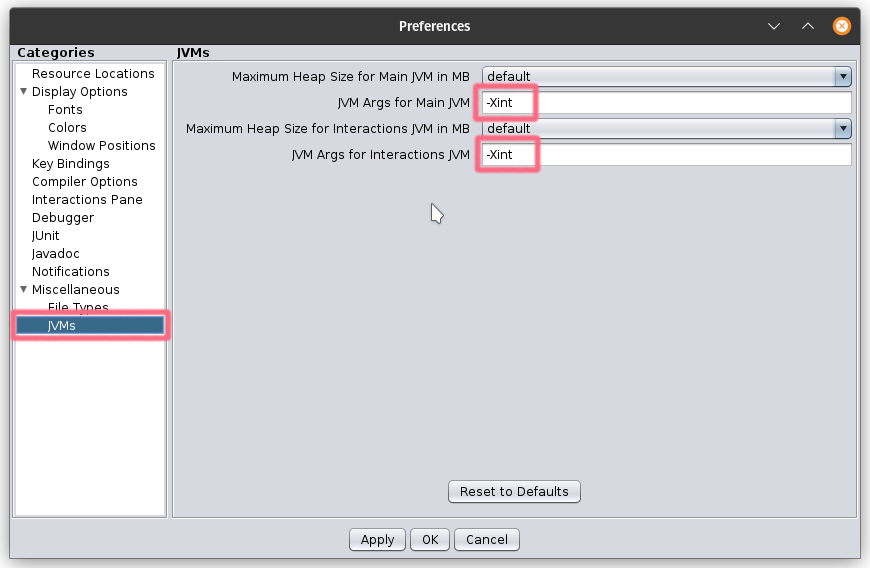
run() to runIgnore()
public static void main( String[] args )
{
    System.out.println( "Hello from regular Java" );

    SortAlgosApp app = new SortAlgosApp();

    app.testSortAlgorithms( 1000, 15000, 1000, 'i' );  // collect data for best case
    System.out.println();

    app.testSortAlgorithms( 1000, 15000, 1000, 'd' );  // collect data for worst case
    System.out.println();

    app.testSortAlgorithms( 1000, 15000, 1000, 'r' );  // collect data for average case
    System.out.println();
}
n?), exponential curve, etc. Our analysis from class suggested a polynomial trendline of either degree 1 (linear) or degree 2 (quadratic).
cs111 (where you run DrJava) hw/SortAlgosApp/src/cs1/SortAlgosApp (this is where your code is saved) SortAlgosApp.java and SortAlgosApp.log and SortAlgosApp.xlsx