General Description
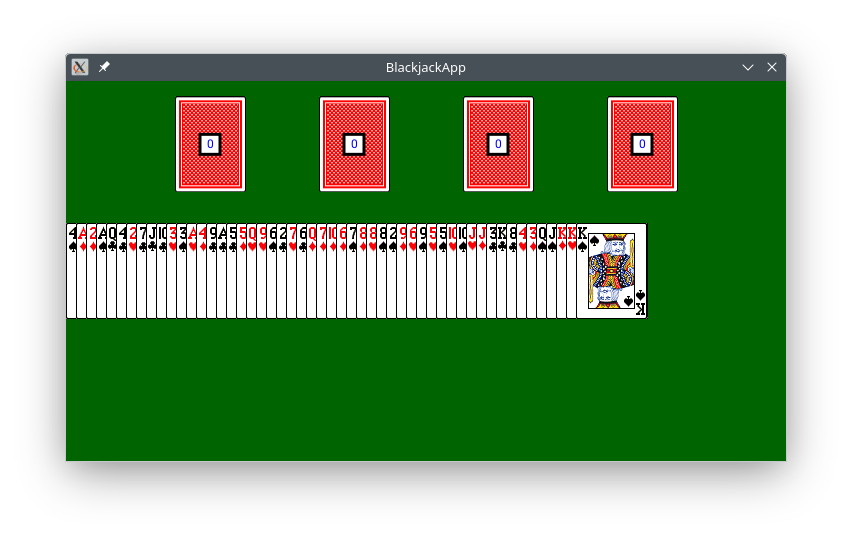
|
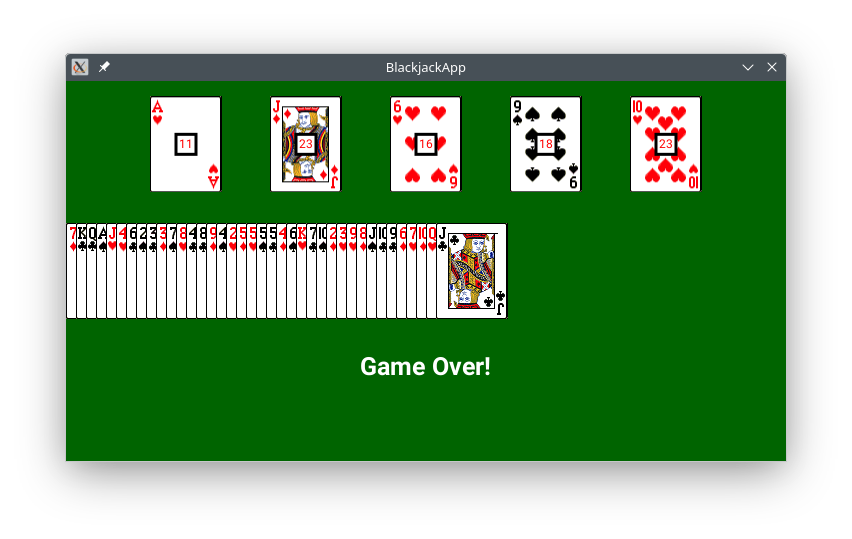
|
The goal of this assignment is to create an app for the popular BlackJack game. In BlackJack players repeatedly draw cards aiming to get as close to 21 as possible.
The focus of this assignment is on for loops and array processing.
|
Preliminaries (New DrJava)
Download the new version of DrJava:
- right-click __drjava.jar__ and choose "Save As.."
- copy over "cs111/software.tmp/drjava/drjava.jar"
- check the toolbar for the new DrJava:
 (should see update date)
This DrJava version includes:
- fix for the messed up logs
Preliminaries
Start DrJava and create a new project named
BlackJackApp in folder
cs111/hw . See the Readings List notes on how to create a new project.
For this app the phone should be put in
landscape/tablet orientation.
Card Images
Download the file
cards.zip and extract it in the app folder
BlackJackApp/res/raw/
cards.zip
Make sure only the ".png" files end up in the required folder without the ".zip" file.
The cards will be represented as integers, either as RS or RRS:
- last digit S is 1, 2, 3, 4 and represents the suit:
1=♣, 2=♦, 3=♥, 4=♠
- leading digits R or RR are 1, 2, 3, ..., 13 and represent the rank:
1=aces, 2=twos, ..., 10=tens, 11=jacks, 12=queens, 13=kings
- see the table for the names of the card images
note that card0.png is the image for the back face
|
| Back | card0.png |
| Aces | card11.png | card12.png | card13.png | card14.png |
| 2s | card21.png | card22.png | card23.png | card24.png |
| 3s | card31.png | card32.png | card33.png | card34.png |
| . . . |
| Queens | card121.png | card122.png | card123.png | card124.png |
| Kings | card131.png | card132.png | card133.png | card134.png |
- 131 is king of ♣: rank 13 and suit 1
- 24 is two of ♠: rank 2 and suit 4
- 102 is ten of ♦: rank 10 and suit 2
|
Game Description
Here is a summary of how the app works:
The app cycles through the (active) players waiting for taps:
- single tap means that the current player would like to get a card; the value of the card is added to the player's total points
- double tap means that the current player does not want a card and should be skipped from now until the end of the game
- a player is automatically skipped whenever the player's total becomes 21 (player won) or greater (player lost)
- the app will use a
boolean array to indicate whether a player is inactive and should be skipped; players become inactive when:
- they won (drew a card that made the total 21)
- they lost (drew a card that made the total go over 21)
- they double-tapped to stop getting cards
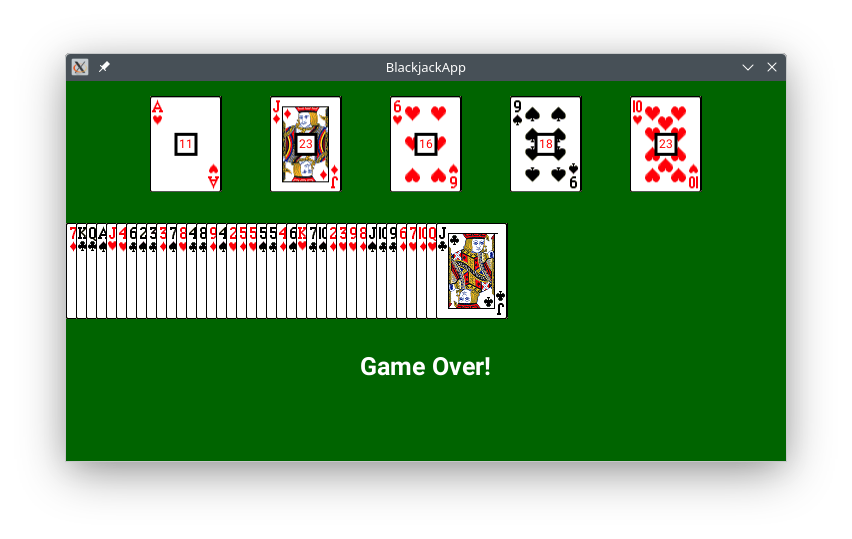
The game terminates when all players are inactive (i.e. some lost, some chose not to draw any more cards, some got 21).
Determining the winners is a bit complicated, so at the end of the game it is sufficient to display a generic game-over message.
General Expectations
- use
for loops in all methods where for loop is appropriate
- all the interactions with the players should be done through a single- or double-tap (anywhere) on the canvas
- all placements of graphical components should be relative to the height (no fixed numbers); typically
1.0/8.0, 1.0/4.0, 3.0/4.0 work well
- submit in a commented section test cases for the methods (see below); make sure to include a variety of test cases including the empty array.
Required Methods
As part of your solution you are asked to implement and utilize the following methods:
printArray(numbers)
This is the method from class. It has the same purpose as System.out.println but for displaying arrays:
void printArray( int[] numbers )
{
    for ( int i = 0 ; i < numbers.length ; i = i + 1 )
    {
        System.out.print( numbers[ i ] + " " );
    }
    System.out.println();
}
generateDeck()
This method returns an array of the following 52 integers (you may use 52 as fixed number in this method only):
{ 11, 12, 13, 14, 21, 22, 23, 24, ..., 121, 122, 123, 124, 131, 132, 133, 134 }
Initially you may use the following simple version of a small deck and come back to this later (see the stages below):
int[] generateDeck()
{
    // (not the final version): builds a small deck of Aces, 2s, Queens, and Kings
    // add any other cards you want and shuffle if you want

    int[] deck = new int[]{ 11, 12, 13, 14, 21, 22, 23, 24, 121, 122, 123, 124, 131, 132, 133, 134 };
    return deck;
}
To test:
printArray( generateDeck() ); // displays 11 12 13 14 21 22 ... 133 134
Eventually write the actual method. Use a single loop to generate the card numbers in groups of four.
Hint: It is easier to build the array in groups of 4, i.e. 4 cards per cycle with a "counter" that changes 1, 2, 3, ..., 13 along with multiplication by 10 (e.g. 123 = 12*10 + 3).
drawCard(x, y, card)
This method draws a card centered at the given (x, y). The last parameter is the integer representation of the card.
No loop and no if. Just glue the card number between the strings "card" and ".png" to create the corresponding file name.
|
drawCard(50, 80, 0);
drawCard(140, 170, 123);
drawCard(230, 260, 101);
|
drawDeck(deck, y, lastIndex)
This method draws all the cards in the given deck (an array of integers) at the given y-level up to and including the card with the given index. The left-most card is drawn such that it touches the left-edge of the screen.
Each card is 72 units wide and the centers of the cards should be 10 units apart (you may use 72 and 10 as fixed numbers in this method).
Hint: this has similarities with drawCirclesRow .

|
drawDeck(new int[]{123, 101, 0, 93, 134, 11}, 55, 2);
drawDeck(new int[]{123, 101, 0, 93, 134, 11}, 155, 5);
drawDeck(generateDeck(), 260, 51);
|
drawPlayers(cards, points, isInactive)
This method takes three arrays that have information about the players:
cards -- array of integers representing the last card given to each playerpoints -- array of integers representing the total number of points for each playerisInactive -- array of booleans representing the status of each player (false for active or true for inactive)
This method draws information about each player: last drawn card (found in first array) and current number of points (found in second array). The points of active and inactive players (status found in third array) are drawn in different colors.
The card centers must be evenly spaced. You need to calculate the correct spacing based on the number of players. (Hint: PacmanApp )
The background square for the point numbers has a fixed size and outline thickness of your choice.
Pick a y level that looks good (e.g. 1.0/6.0 of the canvas height).
You may assume that the given arrays will be of equal lengths.
|
drawPlayers(new int[]{84, 121, 114, 11}, new int[]{10, 18, 12, 3}, new boolean[]{false, true, true, false});
|
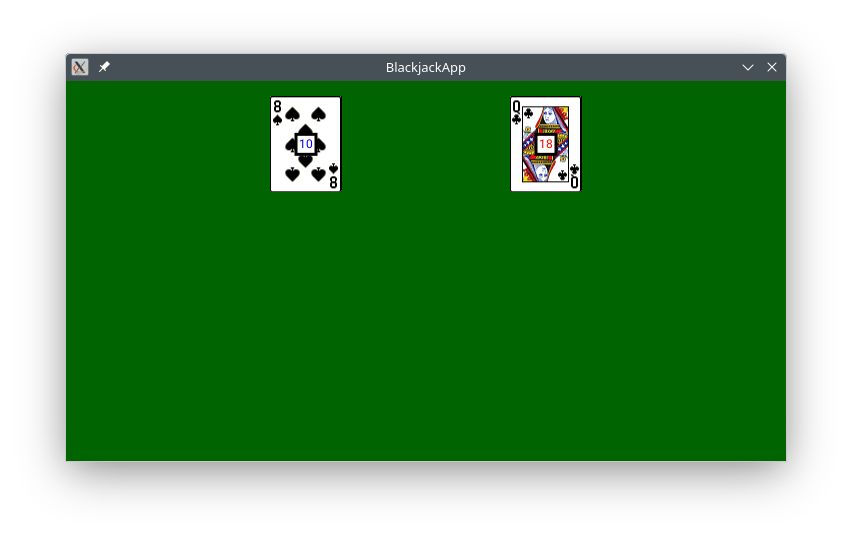
|
drawPlayers(new int[]{84, 121}, new int[]{10, 18}, new boolean[]{false, true});
|
hasFalse(values)
This method is not needed for Stage 1 and could be skipped initially (see the stages below).
This is a boolean method that takes as input an array of ("a bunch of") booleans. The method returns true if the given array contains at least one false.
System.out.println( "has a false? " + hasFalse(new boolean[]{true, true, false, true, false}) );

System.out.println( "has a false? " + hasFalse(new boolean[]{true, true, true}) );
Note: This method will be used in the game to check if there are active players.
computeCardValue(card)
This method is not needed for Stage 1 and could be skipped initially (see the stages below).
This method returns the point value of the card (i.e. the rank of the card). For example, 81, 82, 83, 84 are all worth 8 points, 11, 12, 13, 14, are all worth 1 point, etc.
The point value is simply the card value divided by the integer 10 (Java will discard the fractional part). However, according to the rules of BlackJack the highest point value is 10, so jacks, queens, and kings are all worth just 10 points.
Note: Do not use doubles in this method -- use only ints. When Java divides two integers it discards the fractional part, so 5 / 2 = 2, not 2.5, and 5 / 3 = 1, not 1.667, etc. This is a short method.
System.out.println( "8s are worth: " + computeCardValue(83) );       // 8s are worth 8
System.out.println( "aces are worth: " + computeCardValue(12) );     // aces are worth 1
System.out.println( "queens are worth: " + computeCardValue(124) );  // queens are worth 10 (not 12)
System.out.println( "kings are worth: " + computeCardValue(132) );   // kings are worth 10 (not 13)
shuffle(deck)
This method is not needed for Stage 1 and could be skipped initially (see the stages below).
This method modifies the given array (the deck) by rearranging the cards within the deck.
This is a void method, so it does not return a "result". Instead, the result is observed by seeing that the given array was scrambled.
Use this method in playGame as soon as you create the deck, so that the game begins with a shuffled deck.
The shuffling process works as follows: Pick two random integers from the range of valid indices in the given array and swap/exchange the cards at these indices. It is fine if the two random integers happen to be the same, we still call that a swap.
The number of repetitions is half the length of the deck: in a deck of 100 cards 50 pairs will be swapped; in a deck of 52 cards 26 pairs will be swapped, etc.
Recall that canvas.getRandomInt( a , b ) will give a random integer in [a , b] inclusive.)
// shows an ordered deck

// shows a scrambled deck
// draws the scrambled deck
|
int[] deck1 = generateDeck();
printArray(deck1);
shuffle(deck1);
printArray(deck1);
drawDeck(deck1, 100, 51);
|
int[] deck2 = {11, 12, 13, 14, 131, 132, 133, 134};
printArray(deck2);
shuffle(deck2);
printArray(deck2);
drawDeck(deck2, 200, 7);
|
playGame(n)
This is the main method that coordinates all activities and runs the game with n players. It is described in the next section.
Putting it all together
Make sure you implement the above methods first and test them thoroughly. Submit your test cases as a commented section in your program.
It is best to work in stages. Some suggestions are given below.
Here is a visualization of the game for 4 players along with the various variables (shown in bold) that will be used and updated during the game. These are described also in method
playGame:
Note: When you create an array, Java will put the
blank value by default, i.e. 0 for
int/double arrays and
false for boolean arrays. These are often convenient starting points.
isInactive:   | false | false | false | false |      nobody is inactive initially (Java puts false by default)
total points: |   0   |   0   |   0   |   0   |      nobody has points initially
last card:    |   0   |   0   |   0   |   0   |      nobody has a card initially (Java puts 0 by default)
              ---------------------------------
                  0       1       2       3          player indices
                  ^
                  |
              curPlayer -- keeps track of whose turn it is; tells us
                           which cell in the three arrays to update


deck:       | 11 | 12 | 13 | 14 | ... ... | 131 | 132 | 133 | 134 |
                                                               ^
                                                               |
                                                         dealCardIndex -- the index of the card to deal next:
                                                                          * starts at the end of the deck
                                                                          * it is the index, not the card
Here is a possible starting point for the app.
void playGame(int n)
{
    // 0. show dealer skills: do later after "Dealer Skills"

    // 1. create a deck and shuffle it: (leave shuffle for later, see stages)


    // 2. create three arrays to keep track of the
    //    information about each player in the game:
    //    * array of booleans that tracks the status of each player (active or inactive)
    //    * array of integers that tracks total points of each player (initially 0)
    //    * array of integers that tracks last card drawn by player (initially 0)

    boolean[] isInactive = new boolean[n];     // Java will set all n cells to false by default
                                               // i.e. nobody is inactive / everybody is active

    // similarly, create the other two arrays for points and last card drawn
    // note that Java will put 0 by default in each cell when array is created


    // 3. create two integers to keep track of (see above):
    //    * index of current player: cycle among 0..n-1 (inclusive)
    //    * index of next card to deal from the deck

    as long as there are active players:
    {
         //...........................................................
	 //... the rest of the code goes here:
         //... * clear,
         //      draw scene,
         //      wait for input,
         //      update player details, i.e. update the three arrays above
         //...   (only wait for input and update if player is not inactive)
	 //...........................................................


         // this Java line will increase the current index by 1 to move to the next player,
         // but it will also automatically go back to 0 after the last, i.e. (n-1)th player

         curPlayer = (curPlayer + 1) % n;   // must be last line in loop
    }

    // ...
}
Stage 1
Ignore the active/inactive component and make the loop condition:
while ( curPlayer < 100 )
On each touch give a card to the current player regardless of whether the player has 21 or over. The game will go on forever, but you should see the latest cards given to the players drawn on the screen and the deck shrinking.
Next increase the points of the players by the value of the card they were given. You should now see the points changing on each round.
Stage 2
Deactivate players who were given a card that makes them inactive based on the rules above. You should see the players in different colors.
Fix the loop condition so that the game stops when there no active players.
Stage 3
Deactivate current player if number of taps is 2. Ensure that card is given only if current player is active.
Stage 4
Compute the full deck and shuffle it.
Dealer Skills
Create the following methods that show the dealer card skills (and your programming skills). Make sure to test each method with (a) the empty array; (b) one-element array; (c) multi-element arrays.
reverse(numbers)
(only one loop) This method modifies the given array by reversing the order of its values.
int[] values = {1, 2, 3, 4, 5, 6, 7, 8};
reverse(values);
printArray(values);    // displays 8 7 6 5 4 3 2 1

int[] deck = generateDeck();
reverse(deck);
drawDeck(deck, 150);   // draws the reversed deck
split(numbers)
(only one loop) This method returns a brand new array that contains every other card from the input array. You may assume that the given array will be of even length.
int[] values = {1, 2, 3, 4, 5, 6, 7, 8};
int[] result = split(values);
printArray(result);      // displays 1, 3, 5, 7

int[] deck = generateDeck();
int[] result = split(deck);
drawDeck(result, 150);   // draws half of the deck
merge(numbers1, numbers2)
(only one loop) This method returns a brand new array whose cells contain all the values of the input arrays alternating one cell at a time.
You may assume that the given arrays will be of the same length.
int[] values1 = {1, 3, 5, 7};
int[] values2 = {2, 4, 6, 8};
int[] result = merge(values1, values2);
printArray(result);      // displays 1 2 3 4 5 6 7 8
remove(numbers, discard)
(only one loop) This method returns a brand new array that contains all elements from the first given array (numbers), except for those elements that can be found in the second given array (discard).
You may assume that there will be no duplicate elements within the given arrays and that the second array will not have elements that are not present in the first array.
Hint: Use hasElement from class.
printArray( remove(new int[]{8, 4, 7, 1, 5, 3, 6, 2}, new int[]{2, 7, 3}) );
drawDeck(deck, y)
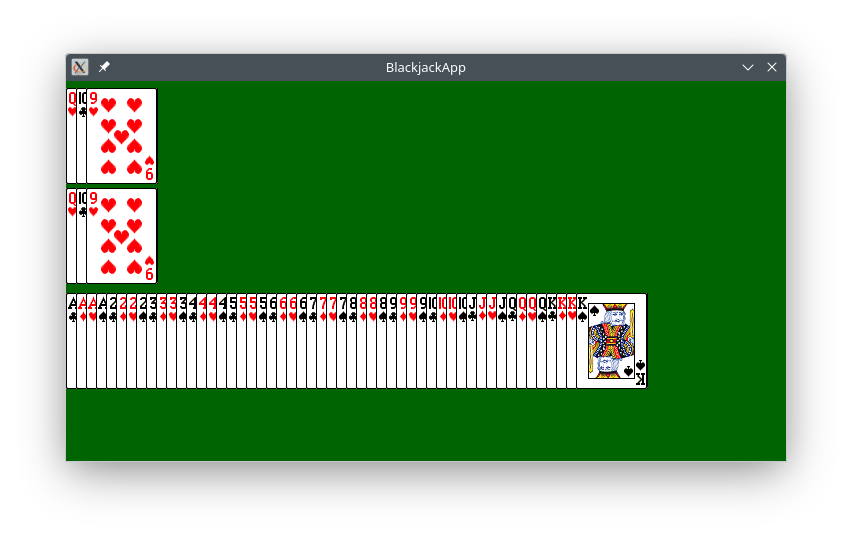
This method is the same as the original but it draws all cards (not up to a given index) in the given deck and it uses a slight delay between each card drawing (for example, 0.05). This is used below in method showSkills
Note: It is fine to have two methods with the same name, since one takes 3 parameters and the other takes 2, so Java will know which one you intend to use.
showSkills()
This method shows the dealer skills and the code is given. Execute it first in playGame
void showSkills()
{
    double height = canvas.getHeight();

    // draw initial deck
    int[] deck = generateDeck();
    drawDeck( deck, height/2 );

    // split the deck and draw each half
    Touch touch = canvas.waitForTouch();
    canvas.clear();
    int[] topHalf = split( deck );
    int[] botHalf = remove( deck, topHalf );
    drawDeck( topHalf, (height - 96)/2 );
    drawDeck( botHalf, (height + 96)/2 );

    //reverse each half and draw it
    touch = canvas.waitForTouch();
    canvas.clear();
    reverse( topHalf );
    reverse( botHalf );
    drawDeck( topHalf, (height - 96)/2 );
    drawDeck( botHalf, (height + 96)/2 );

    //merge the two halves into a single deck
    touch = canvas.waitForTouch();
    canvas.clear();
    deck = merge( topHalf, botHalf );
    drawDeck( deck, height/2 );
}

 (should see update date)