General Description
|
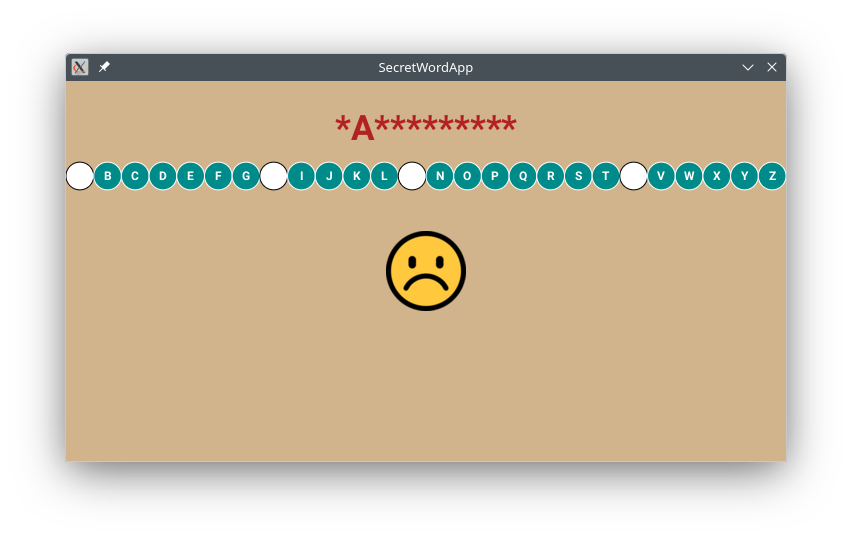
The goal of this assignment is to create an app for the popular word guessing game. The player is presented with a secret word, from which some letters are missing (initially all letters are missing) and the player is given a fixed number of attempts to guess all letters in the secret word.
The focus of this assignment is on for-loops and string processing.
|
Here is a summary of how the app works. The app waits for the player to
guess a letter. For each guess there are three cases to consider (not necessarily in this order):
- The player guessed incorrectly: The app shows an emoji in various stages of despair (0 errors to 6 errors).
- The player guessed correctly a new letter: The app updates the guess word and the canvas with the correct guess filled in; the updated alphabet is also shown to the player.
- The player tried a previously used letter (regardless of whether it was right or wrong): This is not considered to be an error, so the emoji is not updated.
In each of the above cases the app also plays the relevant ringtone.
The game terminates after one of the following situations:
- 6 wrong guesses
- correctly guessed word
As soon as the game is over the app displays an appropriate message, reveals the secret word on the canvas, and plays the corresponding ringtone.
Preliminaries (New DrJava)
Download the new version of DrJava:
- right-click __drjava.jar__ and choose "Save As.."
- copy over "cs111/software.tmp/drjava/drjava.jar"
- check the toolbar for the new DrJava:
 (should see "Preferences" button)
This DrJava version includes:
- the "Preferences" button
- canvas functionality for images and audio
General Expectations
- create a new project named SecretWordApp in folder cs111/hw
- use
for loops in all methods where for loop is appropriate
- all the interactions with the player should (eventually) be done through the canvas by touching one of the letters
- all placements of graphical components should be relative to the height (no fixed numbers); typically
1.0/8.0, 1.0/4.0, 3.0/4.0, 2.0/3.0 work well
- at the end inform the player of the outcome of the game and what the secret word was along with the last emoji before the game finished
- include in a commented section the test cases for the methods; make sure to include a variety of test cases including the empty string
Required Methods
As part of your solution you are asked to implement and utilize the following methods:
- make sure to test each method carefully before moving on to the next one
drawAlphabet( alphabet, radius )
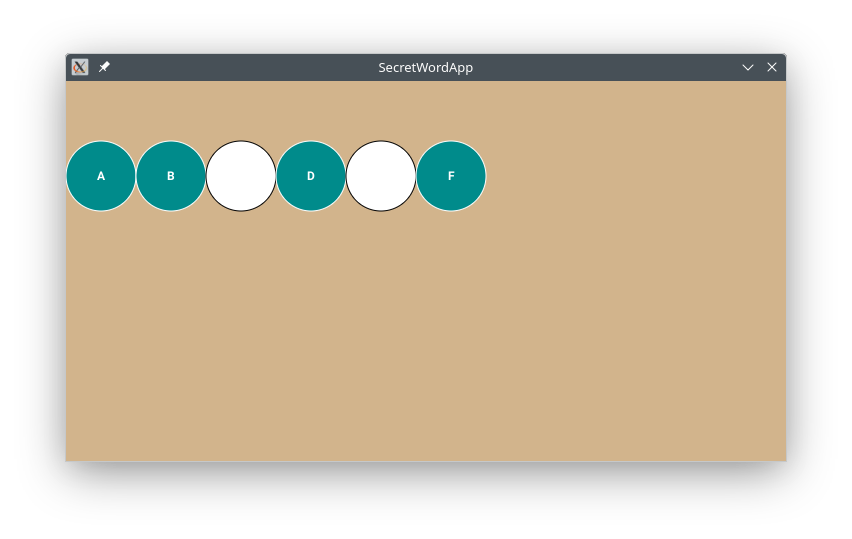
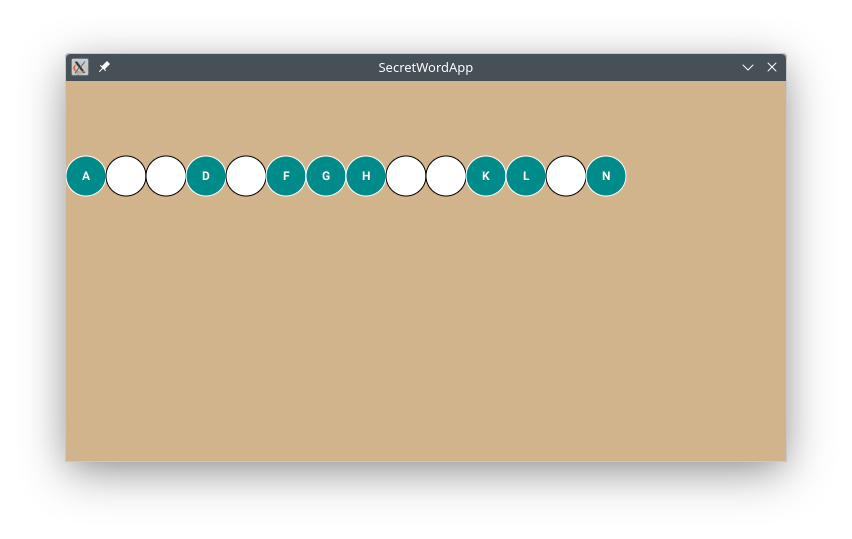
This method draws the given alphabet string as a row of circles of the given radius. The y-level is one fourth of the canvas height.
The given alphabet string will contain letters and '*' where '*' represents a letter that has been used.
Each letter is drawn at the center of the corresponding circle. If the letter has been used before (i.e. there is '*' in its position in the alphabet) draw a circle in a different color with no symbol inside:
|
drawAlphabet( "AB*D*F", 35 );

drawAlphabet( "A**D*FGH**KL*N", 20 );
|
hasLetter( phrase, letter )
This method returns true if the given phrase has the given letter; otherwise false is returned:
hasLetter("hello", 'l')       returns true
hasLetter("hello", 'a')       returns false
Sample test cases (show more):
System.out.println( "Is l in hello: " + hasLetter("hello", 'l') );
System.out.println( "Is a in hello: " + hasLetter("hello", 'a') );
makeBlankString( n )
This method returns a string of n '*' characters. This is a simple method that just glues one '*' at a time:
makeBlankString(4)       returns "****"
makeBlankString(2)       returns "**"
makeBlankString(0)       returns ""
Sample test cases (show more):
System.out.println( "string with 4 stars: " + makeBlankString(4) );
System.out.println( "string with 2 stars: " + makeBlankString(2) );
replaceLetter( phrase, oldLetter, newLetter )
This method takes a phrase and two letters as parameters. It returns a brand new string that is a modification of the given phrase such that all occurrences of the oldLetter are replaced by the newLetter:
replaceLetter("kelly", 'l', 'n')          returns "kenny"
replaceLetter("abcdef", 'd', '*')         returns "abc*ef"
Note: Later in Stage 1 this method will be used to replace the guessed letter in the alphabet with '*' as shown here:
var? = replaceLetter( var1, var2, var3 );
revealLetter( secretPhrase, guessedPhrase, letter )
This method takes two phrases and a letter as parameters. It returns a brand new string that is a modification of the second phrase such that all locations in the second phrase that correspond to locations in the first phrase that contain the given letter are replaced by that letter:
revealLetter("hello", "*****", 'l')          returns "**ll*"
revealLetter("indigo", "*n***o", 'i')        returns "in*i*o"
revealLetter("indigo", "*n***o", 'p')        returns "*n***o"
You may assume that the given phrases will always be of equal lengths.
Note: Later in Stage 1 this method will be used to update the partially guessed word with the latest guess based on the secret word as shown here:
var? = revealLetter( var1, var2, var3 );
equalStrings( str1, str2 )
This method returns true if the given strings are identical; otherwise false is returned. (Initially assume that the strings are the same length and once everything works make adjustments to handle different lengths.)
equalStrings("hello", "hello")       returns true
equalStrings("hello", "Hello")       returns false
equalStrings("hello", "hi")          returns false
Note: In Java cannot use the ==, != operators to compare strings. Instead, need to use the method equalStrings.
playGame()
This is the main method that coordinates all activities and runs the game. It is described in the next section.
App Stages
Make sure to implement the above methods first and test them thoroughly. Submit your test cases as a commented section in your program. Make sure to test each method with (a) the empty string; (b) one-letter string; (c) two-letter string; (d) at least of couple of examples of multi-letter string.
Each stage represents a simpler version of the app. Your submission should only include the final version (last stage).
Eventually, the player should be able to select a letter by tapping on the corresponding circle. However, in the beginning it might be easier to show a box in which the player types the letter:
char varName = canvas.readChar( "Pick a letter" )
When everything works use the code from
CoinsGameApp to get the index of the tapped circle -- then you can look up the letter in the alphabet at that index. You won't need to use Y-coordinate or number of taps.
Stage 1
For this stage assume that:
- the selected character is read from the text box:
char varName = canvas.readChar( <short-message> )
- the player has unlimited attempts to guess the phrase
- no emoji image needs to be displayed
- no ringtones need to be played
For this stage assume that the player always guesses correctly. This means that on each turn:
- some letter(s) will be revealed in the guess word at the top
- different colored circles will start to appear in the alphabet where the chosen letters were
Here is a possible starting point for method
playGame. For this stage the game should stop when the player guesses all letters correctly:
Hint: If you are having trouble with method
equalStrings, you can use
hasLetter to determine if the player guessed the secret word, since the letter/symbol
'*' will not be in the
guessed word. However, the final version should use
equalStrings where appropriate.
void playGame()
{
    // String secretWord = canvas.getRandomColor().toUpperCase();
    String secretWord  = "SEASHELL";
    String guessWord = makeBlankString( 8 );
    String alphabet = "ABC...Z";
    double radius = 13.5;

    //
    // any other variables you need
    //

    while ( ???? )
    {
         //.................................................................
	 //... the rest of the code goes here: .............................
	 //... * clear screen, draw game, wait for input, update strings ...
	 //.................................................................
	 //
	 //... see the notes above in replaceLetter and revealLetter .......
	 //... on how to overwrite/change a string with a new string .......
    }

    // ...
}
Note: You need to keep track of the letters that have been guessed so far so that white circles start to appear. To accomplish this, for each new guess replace in the
alphabet the guessed letter with
'*' (you have a method for this). For the later stages you will know whether a particular letter has been used previously, by checking if it is in the
alphabet.
Stage 2
This stage can be skipped and completed later at any point.
Modify
playGame so that letter is selected via touch on the screen. Adapt the touch selection code (minor change necessary) from
CoinsGameApp. Note that the
y coordinate and number of taps are not used here.
Stage 3
Modify
playGame so that the player is allowed 6 incorrect attempts. Play the game with a mix of correct and wrong guesses and see if it stops when (i) there are no attempts left, (ii) the word was guessed. Tell the player whether the game was won or lost.
Stage 4
Modify
playGame so that the correct emoji is displayed as the player accumulates errors.
Save the following images (right-click, save as...) in folder
SecretWordApp/res/raw:

errors0.png |

errors1.png |

errors2.png |

errors3.png |

errors4.png |

errors5.png |

errors6.png |
Write the following method:
drawEmoji( errors )
This method draws the image that corresponds to the given number of errors 0 to 6, i.e. "errorsX.png".
Initially, you could use a chain of if statements. Eventually, remove any ifs and use string gluing to put the filename together from the fixed words and the variable number of errors.
Figure out where to use this method in playGame so that the latest emoji is always displayed to the player.
To draw an image use:
canvas.drawImage(centerX, centerY, "image-name.png")
Stage 5
Modify
playGame so that the correct ringtone is played on each move and also at the end of the game.
Save the following ringtones (right-click, save as...) in folder
SecretWordApp/res/raw:
To play a ringtone use:
canvas.playAudio( "audio-name.wav" );
Stage 6
Modify
playGame so that the secret word is a randomly chosen color in upper-case letters. What else needs to change now that the secret word is no longer the 8-letter "SEASHELL"?
Currently the radius is computed for 26-letter alphabet. Make the necessary modifications, so that the game can be played in other languages that have a different number of letters.
Write the following method:
calculateRadius(alphabet)
This method calculates the radius of the circles based on the number of letters in the alphabet, so that the alphabet circles span edge to edge along the screen horizontally.
