
CalcApp write the procedures described below. Make sure to test each procedure carefully before moving on to the next one.
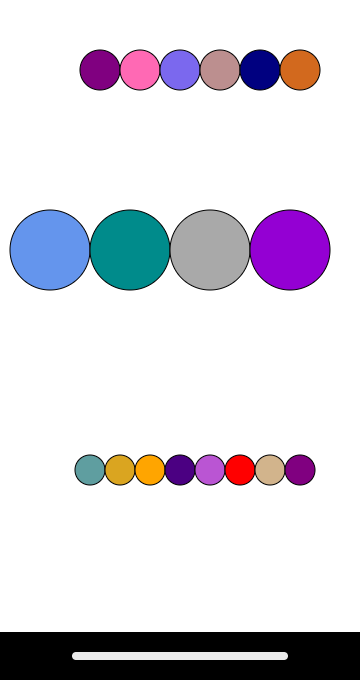
drawCirclesRow( startX, startY, radius, n )
Starting at (startX,startY) draws a row of n touching circles of the given radius and in random color.
Here is how to draw a circle in random color (initially it is fine to use the same color for all circles):
String color = canvas.getRandomColor();
canvas.drawCircle( ?, ?, ?, color );                // no outline
canvas.drawCircle( ?, ?, ?, color + "(black)" );    // with outline
(click to enlarge) |
|
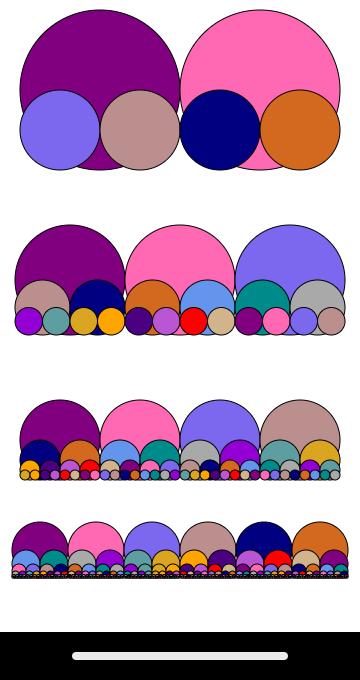
drawCirclesForest( startX, startY, radius, n )
Draws a "forest" built of n rows of circles. The given radius specifies the size of the biggest circles and (startX,startY) specify the coordinates of the center of the biggest left-most circle.
Note that:
n circlesdrawCirclesRow. Only one loop is needed here, even though you are drawing lots of rows.
(click to enlarge) |
|
CalcApp write the procedures described below. Make sure to test each procedure carefully before moving on to the next one.
Here are the detailed descriptions of the procedures for the app along with sample test cases:
mystery( x, n )
This procedure computes/returns an approximation of the inverse of the tan function by adding the first n ≥ 0 terms in the following expression:
Here are a couple of examples (shown up to the 3rd digit after decimal point):x - x3/2 + x5/3 - x7/4 + x9/5 - x11/6 ... and so on
Hint: Work in stages:mystery( 753.68, 0 ) will compute 0 asked for 0 blobs to be added mystery( 2.0, 4 ) will compute -23.333 (2 ... 27/4) mystery( 3.0, 3 ) will compute 70.5 (3 ... 35/3)
+ and there are no divisions, so just a sum of the given powerssavings( deposit, rate, years )
This procedure computes/returns the amount in a savings account after the given number of years >= 0 based on the initial deposit and interest rate.
Here is how banks compute the amount in an interest-bearing savings account with an interest rate compounded annually:
Here are a couple of examples (shown up to the 3rd digit after the decimal point):after 0 years = 100.0 (as soon as the account is opened it is just has the initial deposit) after 1 year = 110.0 100.0 + 0.10*100.0 after 2 years = 121.0 110.0 + 0.10*110.0 after 3 years = 133.1 121.0 + 0.10*121.0 after 4 years = 146.41 146.41 + 0.10*146.41 after 5 years = 161.051
savings( 100, 0.10, 3 )    will compute    133.1      (ran for 3 years)
savings( 200, 0.05, 4 )    will compute    243.101    (ran for 4 years)
sqrt( x, steps )
This procedure computes/returns the square root of the given number x using the Babylonian method for the given number of steps >= 0.
The Babylonian method for computing the square root of a number, x, works as follows:
The computed result is 26.419 and the actual value is 26.038. Not bad for only 5 steps. Here are a couple of examples (shown up to the 3rd digit after the decimal point):guess = 339 (starts at half of the given number 678) guess = 170.5 (339 + 678 / 339) / 2 (after 1 step) guess = 87.238 (170.5 + 678 / 170.5) / 2 (after 2 steps) guess = 47.505 (87.238 + 678 / 87.238) / 2 (after 3 steps) guess = 30.888 (47.505 + 678 / 47.505) / 2 (after 4 steps) guess = 26.419 (30.888 + 678 / 30.888) / 2 (after 5 steps; done)
sqrt( 678, 3 )    will compute   47.505   (ran process for 3 steps)
sqrt( 225, 4 )    will compute   15.415   (ran process for 4 steps)
sequence( n )
This procedure computes/returns the n-th number (n ≥ 1) in the following sequence of integers:
This sequence is generated in the following way:1st 2nd 3rd 4th 5th 6th 7th 8th 9th 10th 11th 12th 13th 14th -2, 0, -1, -3, 3, -5, -1, 7,-17, ? ? ? ? -65
i-th number is twice the number 3 spots before minus the number one spot beforeai = 2*ai-3 - ai-1sequence( 6 ) will compute -5 (the 6-th number) sequence( 8 ) will compute 7 (the 8-th number)
show test cases
In public void run(), give several test cases of your own that demonstrate that your code is correct.
For this assignment it will not be sufficient to give only 3 test cases per procedure. There are multiple inputs that need to be varied so at least 5 test cases will be needed per procedure.
These would be commented out with // as we do in class.
cs111 (where you run DrJava) hw/CalcApp/src/cs1/CalcApp (this is where your code is saved) CalcApp.java (ignore the other files)