General Description
|

|
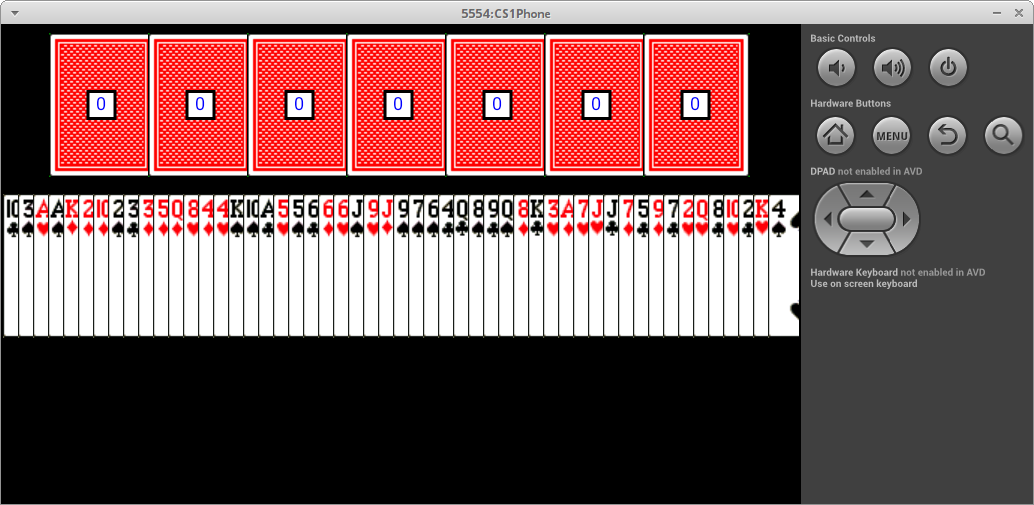
The goal of this assignment is to create an app for the popular BlackJack game. In BlackJack players repeatedly draw cards aiming to get as close to 21 as possible. In our version of the game the players compete only against each other. The winner is the player who gets as close as possible to 21 without exceeding it.
|
The focus of this assignment is on
Java and
Object-Oriented Programming.
Preliminaries
Start DrJava and create a new project named
OOPBlackJackApp in folder
cs111/hw . See the Readings List notes on how to create a new project.
For this app the phone should be put in
landscape/tablet orientation.
Card Images
Download the file
cards.zip and extract it in the app folder
OOPBlackJackApp/res/raw/
card images
Delete the .zip file after extracting the .png images.
The cards will be represented as integers either as RS or RRS:
- last digit S is 1, 2, 3, 4 and represents the suit:
1=♣, 2=♦, 3=♥, 4=♠
- leading digits R or RR are 1, 2, 3, ..., 13 and represent the rank:
1=aces, 2=twos, ..., 10=tens, 11=jacks, 12=queens, 13=kings
- see the table for the names of the card images
note that card0.png is the image for the back face
|
| Back | card0.png |
| Aces | card11.png | card12.png | card13.png | card14.png |
| 2s | card21.png | card22.png | card23.png | card24.png |
| 3s | card31.png | card32.png | card33.png | card34.png |
| . . . |
| Queens | card121.png | card122.png | card123.png | card124.png |
| Kings | card131.png | card132.png | card133.png | card134.png |
- 131 is king of ♣, i.e. rank 13 and suit 1
- 24 is two of ♠, i.e. rank 2 and suit 4
- 102 is ten of ♦, i.e. rank 10 and suit 2
|
Game Description
Here is a summary of how the app works. The app cycles through the (active) players waiting for taps:
- single tap means that the player would like to draw a card; the value of the card is added to the player's total points
- double tap means that the player does not want a card and should be skipped from now on until the end of the game
- a player is automatically skipped whenever the player's total becomes 21 (player won) or greater (player lost)
The game terminates when all players are inactive (i.e. some lost, some chose not to draw any more cards, some got 21).
Determining the winners is a bit complicated, so at the end of the game it is sufficient to display a generic game-over message.
Use good programming style and show evidence of thorough testing.
Testing the Code
The code will be tested in two ways:
public void run() method of OOPBlackJackApp:
- any methods (of any class) that draw will be tested in the
run() method of class OOPBlackJackApp
- make sure to switch to the file with class
OOPBlackJackApp and that it has method public void run()
- only class
OOPBlackJackApp will have method public void run()
public static void main(String[] args) method of the class you are testing:
- any non-drawing methods of a class will be tested in the
main(..) method of that class
- all classes, except
OOPBlackJackApp, should have method public static void main(String[] args)
- here is an example of testing the non-drawing methods of the
Balloon class with method main(..).
Balloon.java (scroll all the way down)
Object-Oriented Programming
Implement
OOPBlackJackApp using the Object-Oriented Programming style by creating the classes described below.
 |
To create a new class:
- click the Add button
- should see a tiny box in which to type the name of the class
- if you see a big box with lots of buttons, hit Cancel and try again
- if you create class Balloon it is good to check that file Balloon.java exists in folder:
cs111/hw/OOPBlackJackApp/src/cs1/OOPBlackJackApp
- if you see folder named Balloon/ or Balloon.java/, delete it and start again
|
| enhanced for loop |
|---|
use enhanced for-loop wherever appropriate (see ArrayList class notes)
|
| the ? marks |
|---|
|
the ? marks below ask whether a method needs additional information; if so, fill in the needed parameters
|
Card Class |
|---|
| Data Members |
rank -- the numeric rank of the card 1..13suit -- the numeric suit of the card 1..4points -- the point value of the card; Aces are worth 1 point, Twos are worth 2 points, ..., Tens are worth 10 points, and Jacks, Queens, Kings are worth only 10 pointsfilename -- the name of the file with the card image
|
| Constructors |
Constructor( initNumber, ? ) -- creates a card with the given "full number", i.e. 132 and sets all data members to correct values
|
| Methods |
getPoints( ? ) -- returns the card pointsgetWidth( ? ) -- returns the width of the card image -- this is fixed to 71 pixelsgetHeight( ? ) -- returns the height of the card image -- this is fixed to 96 pixelsdraw( x, y, ? ) -- draws the image of the card centered at the given (x, y) coordinates
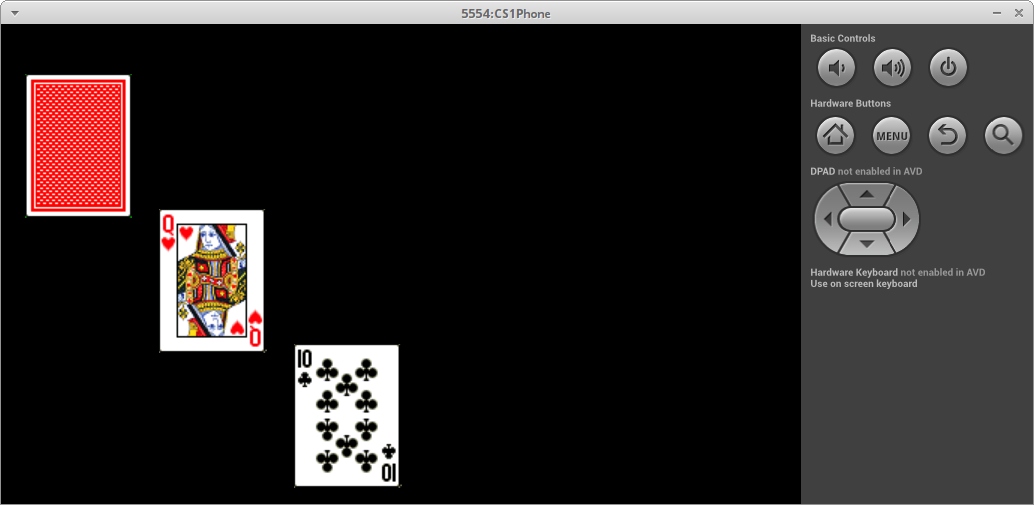 |
card1.draw( 50, 80, ? );         // assuming you created card 0
card2.draw( 140, 170, ? );       // assuming you created card 123
card3.draw( 230, 260, ? );       // assuming you created card 101
|
getRank( ? )
- returns the card rank as one of the words
"Ace","Two",...,"King" (not the numeric rank)
- store the ranks in a primitive array and return the corresponding word (see the
palette variable in method fillAllRegions in Assignment 10)
- initially could simply return
"UnknownRank"
getSuit( ? )
- returns the card suit as one of the words
"Clubs","Diamonds","Hearts","Spades" (not the numeric suit)
- use Java
switch statement (initially could use if statements)
- initially could simply return
"UnknownSuit"
- getName( ? )
- returns the name of the card as a string in the following format:
"Ace of Spades"
- initially could simply return
"UnknownName"
|
| Testing |
In Card class main method:
        Card card1 = new Card( 84, ? );

        System.out.println( "card rank : " + card1.getRank( ? ) );      // Eight
        System.out.println( "card rank : " + card1.getSuit( ? ) );      // Spades
        System.out.println( "card rank : " + card1.getName( ? ) );      // Eight of Spades
        System.out.println( "card value: " + card1.getPoints( ? ) );    // 8
        System.out.println( "card width : " + card1.getWidth( ? ) );    // 71
        System.out.println( "card height: " + card1.getHeight( ? ) );   // 96

        // create a few more cards and test all non-drawing methods
In OOPBlackJackApp class run method:
        Card card1 = new Card( 84, ? );

        card1.draw( 80, 100, ? );

        // create a few more cards and draw at various places
|
Player Class |
|---|
| Data Members |
name -- the name of the playerpoints -- the number of points the player has so faractive -- the status of the player, i.e. still playing or notlastCard -- the last card collected by the player (initially, the player only has card number 0, which is the blank card)
|
| Constructors |
Constructor( initName, ? ) -- creates an active player with the given name, no points, and the card 0
|
| Methods |
getName( ? ) -- returns the player namegetPoints( ? ) -- returns the player points so farisActive( ? ) -- returns whether the player is active or notstopPlaying( ? ) -- deactivates the player, so from now on it is no longer playingcollectCard( card, ? ) -- gives the player a card and ... ...draw( x, y, ? ) -- draws the player centered at the given (x, y) coordinates by drawing the last card collected by the player along with the player points in red/blue if inactive/active inside a white square with black border; the player name is drawn directly on the bottom edge of the card
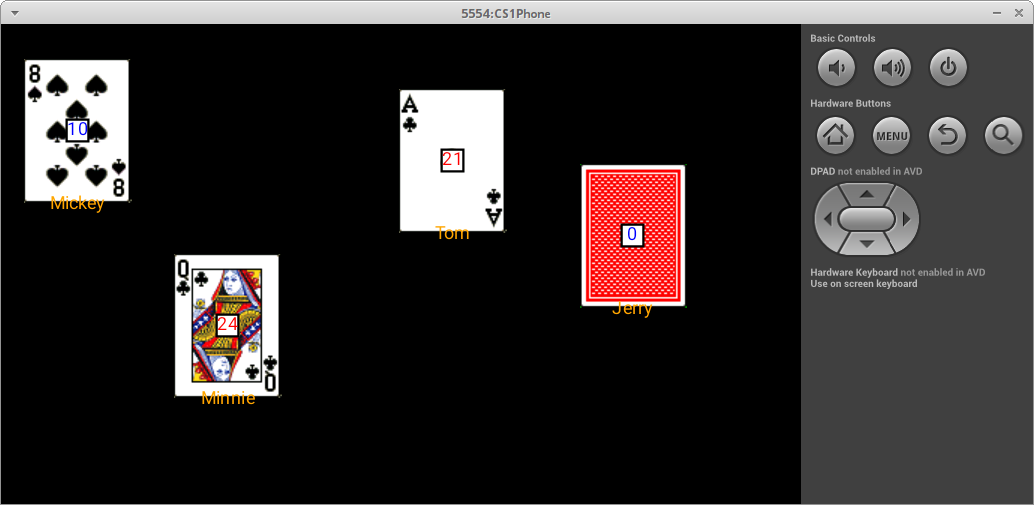 |
mickey.draw( 50, 70, ? );      // assuming Mickey's last card was 8 of clubs and it increased his points to 10
minnie.draw( 150, 200, ? );    // assuming Minnie's last card was Queen of Spades and it increased her points to 24
tom.draw( 300, 90, ? );        // assuming Tom's last card was Ace of Spades and it increased his points to 21
jerry.draw( 420, 140, ? );     // assuming Jerry's last card was Ace of Spades and it increased his points to 21
|
|
| Testing |
In Player class main method:
        Player mickey = new Player( "Mickey", ? );

	System.out.println( "player name: " + mickey.getName( ? ) );      // Mickey
        System.out.println( "player points: " + mickey.getPoints( ? ) );  // 0
        System.out.println( "player active: " + mickey.isActive( ? ) );   // true

	Card card1 = new Card( 64, ? );

	mickey.collectCard( card1, ? );

        // display player's detail again to see if points changed

        // create a few more cards give them to the player and
	// display the player's detail

        // deactivate the player (tell player to stop) and display
	// player's details to make sure not active

        // create another player, give some of the previous cards to
	// new player and display the player's detail as above
In OOPBlackJackApp class run method:
        Player mickey = new Player( "Mickey", ? );

        mickey.draw( 80, 100, ? );

	Card card1 = new Card( 113, ? );

        mickey.collectCard( card1, ? );

        mickey.draw( 200, 100, ? );

        // give player a few more cards and redraw to see if updated correctly
|
Deck Class |
|---|
| Data Members |
|
| Constructors |
Constructor( ) -- creates a deck of 52 cards; use two nested loops to generate the card numbers (and thus the cards themselves)
|
| Methods |
deal( ? ) -- returns the last card in the deck; ensures that card is no longer in the deckshuffle( ? ) -- shuffles the cards in the deck by picking two random indices and swapping the corresponding cards; this is repeated twice as many times as the number of cards in the deck draw( y, ? ) -- draws the cards in the deck at the given y level such that the left-most card touches the left edge of the canvas/phone and the centers of the cards are exactly 10 pixels apart
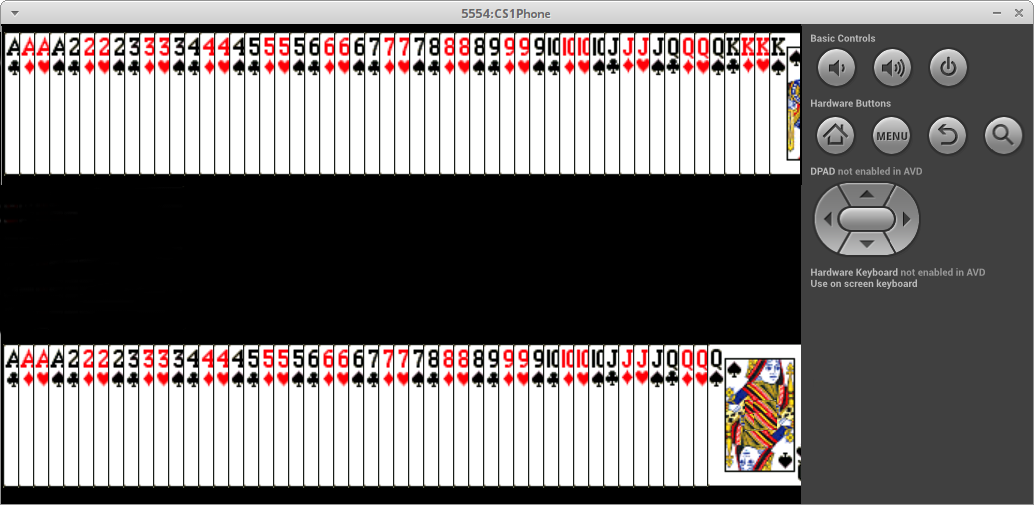 |
deck.draw( 55, ? );    // assuming no cards dealt from deck

deck.draw( 250, ? );   // assuming 4 cards (the Kings) dealt
|
|
| Testing |
In Deck class main method:
        Deck deck = new Deck();

	Card card = deck.deal( ? );

        // display card details (points, rank, etc.) -- should be King of Spades

        // deal three more cards and display their details -- should be the other Kings

        // deal one more card and display its details -- should be the Queen of Spades
In OOPBlackJackApp class run method:
        Deck deck = new Deck();

        deck.draw( 55, ? );

        // deal four cards from the deck and redraw it
	// somewhere below -- should be missing the Kings

        // shuffle the deck and redraw it
|
Casino Class |
|---|
| Data Members |
|
| Constructors |
Constructor( ) -- creates a casino with no players
|
| Methods |
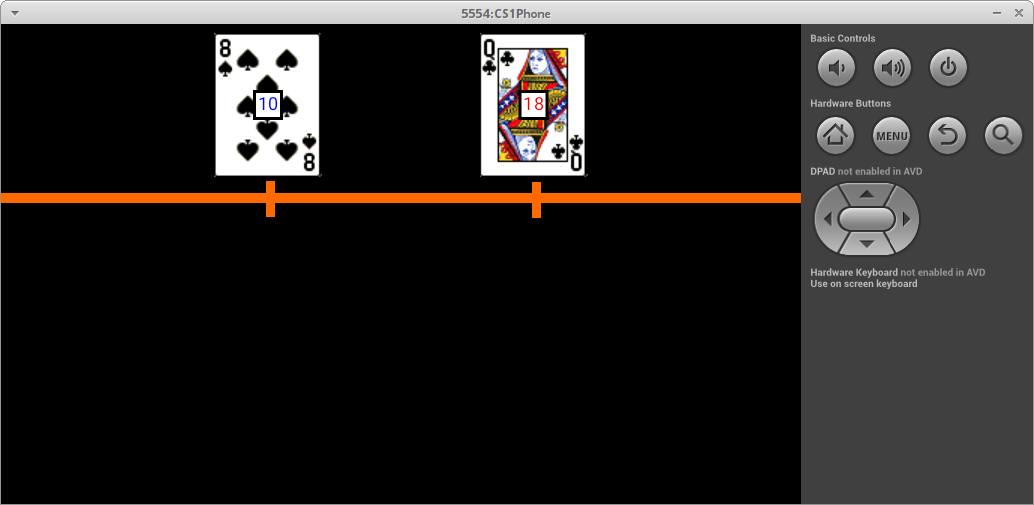
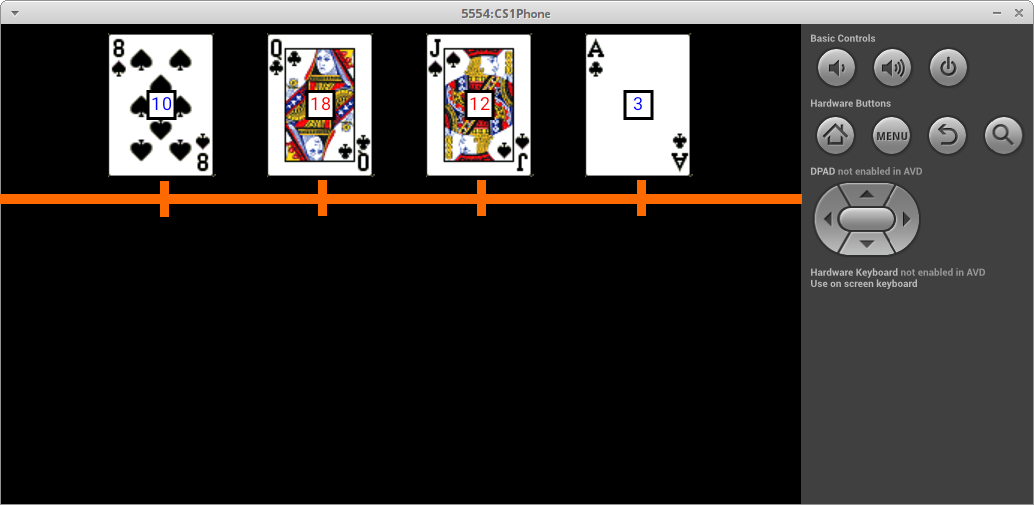
add( player, ? ) -- adds the given player to the list of players in the casinohasActive( ? ) -- returns whether there is still (at least one) active player in the casinodrawPlayers( ? ) -- draws the players in the casino such that the tops of the cards touch the top of the phone and the players are evenly spaced horizontally (the spacing will depend on the number of players in the casino); the height of a card can be found by creating the blank card and interacting with it
|
casino.drawPlayers( ? );

// left image assumes only 2 players in casino

// right image assumes 4 players in casino
|
playGame( ) -- runs the game with the players in the casino and with a new deck of cards (make sure to shuffle the deck); the game scene displays the players evenly spaced and touching the top of phone/canvas, with the deck touching the left edge of phone/canvas centered vertically:
| waiting for first player | | part-way through game |
|---|
|
|
|
|
Here is a partial structure for this method:
proc playGame()
{
    create a deck and shuffle it

    keep track of index of current player -- cycle among 0..n-1 (inclusive)

    as long as there are active players:
    {
         //...........................................................
         //    the rest of the code goes here:
         //
         //    draw scene, wait for input, update player details
         //          single tap means player wants a card,
         //          double-tap means player wants to stop playing
         //
         //          [ only wait for input if player is active ]
         //...........................................................


         // move on to next player, but start at 0 if currently at last player
    }

    // ...
    // ...
}
|
| Testing |
In OOPBlackJackApp class run method:
        // create an empty casino

        // create 4-5 players and add them to the casino

        // draw the players to see if method works correctly, then comment out

        // check if there are active players, then comment out

        // play the game (after the previous test cases pass)
|
What to turn in
Turn in the Java code for the app in the
Assignment 11 dropbox:
- open Finder/FileExplorer and go to folder
cs111 (where you run DrJava)
- go to
hw/OOPBlackJackApp/src/cs1/OOPBlackJackApp (this is where your code is saved)
- upload all
.java and .log files (ignore the other files)